ARA Sandbox Service
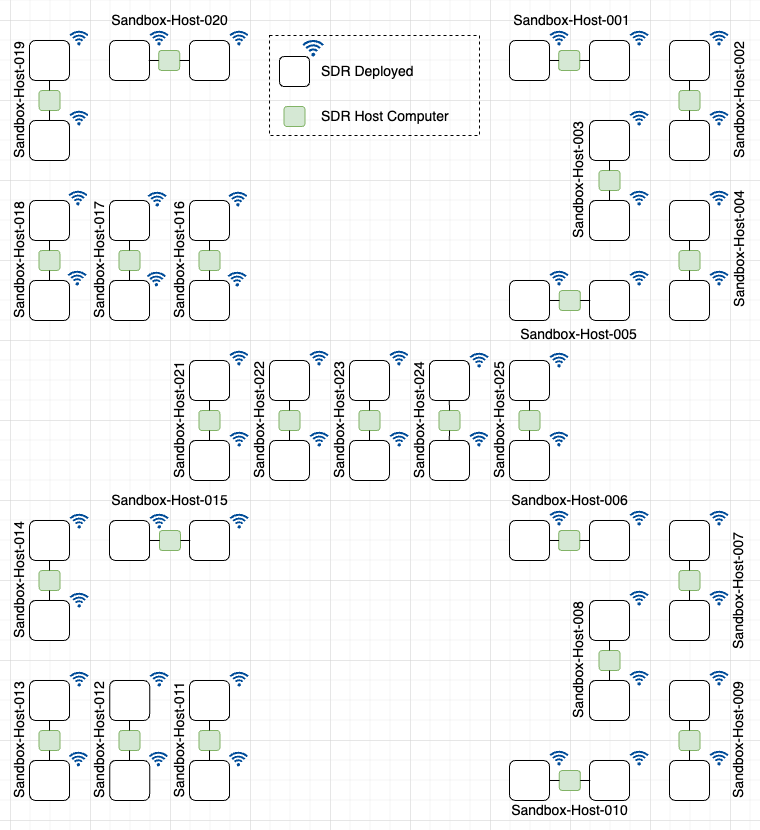
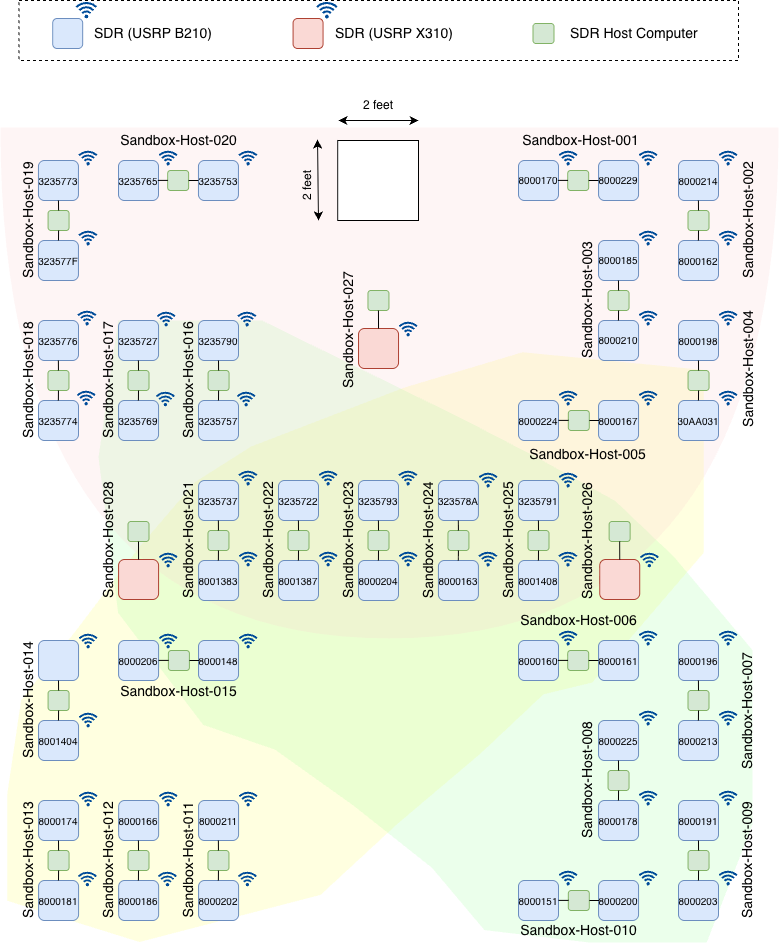
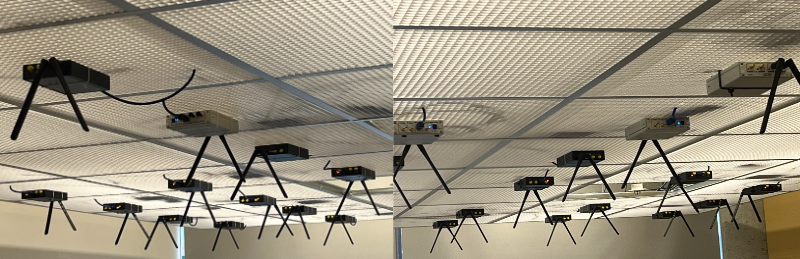
Beside the outdoor deployment as specified in ARA Resource Specification, ARA provides a sandbox environment for users to test their experiments in a controlled lab setting. The sandbox is equipped with 50 USRP B210s and 3 USRP X310s, deployed on panels mounted just below the room ceiling (topology shown in the figure below). Each SDR host computer (001–025) is connected to two SDRs via USB 3.0 cables; thus, reserving one node provides access to two SDRs. The corresponding SDR serial numbers are indicated within each SDR. In contrast, SDR host computers (026–028) are each connected to a single X310, meaning that reserving one of these nodes provides access to one X310. Additionally, the host computers are connected to the ARA cloud via Netgear switches.
Note
An SDR (blue box) without a serial ID indicates that it is under testing. The serial ID will be updated shortly.
The coverage provided by each USRP X310 SDR (used as a base station) for the B210s is shown in the following figure.
B210-to-X310 Cell Mapping
Each USRP X310 acts as a base station (cell) covering a subset of the room, and the shaded lobes in the coverage figure above show which USRP B210s fall inside each cell. The tables below translate those lobes into an explicit mapping, so that users can pick a B210 (UE) that is guaranteed to be in range of the X310 (BS) they reserve.
The three X310 cells are:
X310 Cell |
Location in Room |
B210 Host Computers Covered |
|---|---|---|
Sandbox-Host-026 |
Center right |
006-010, 015*, 016-017, 021-025 |
Sandbox-Host-027 |
Top center |
001-005, 016-017, 018*, 019-025 |
Sandbox-Host-028 |
Center left |
003*, 004*, 005, 006*, 011-013, 014*, 015, 021-025 |
Note
Host computers marked with * are only partially covered
by that cell (one of the two B210s sits on the edge of the
lobe). See the per-SDR table below for the exact breakdown.
Because reserving a single Sandbox host computer (001-025) grants
access to both of its B210s, the following table lists the coverage
for every individual B210 serial ID. Yes means the B210 sits fully
inside that X310’s coverage lobe, Edge means the lobe boundary runs
through the B210’s position (usable, but expect lower SNR), and No
means it is outside that cell.
SDR Host Computer |
B210 Serial ID |
Sandbox-Host-026 |
Sandbox-Host-027 |
Sandbox-Host-028 |
|---|---|---|---|---|
Sandbox-Host-001 |
8000170 |
No |
Yes |
No |
Sandbox-Host-001 |
8000229 |
No |
Yes |
No |
Sandbox-Host-002 |
8000214 |
No |
Yes |
No |
Sandbox-Host-002 |
8000162 |
No |
Yes |
No |
Sandbox-Host-003 |
8000185 |
No |
Yes |
No |
Sandbox-Host-003 |
8000210 |
No |
Yes |
Edge |
Sandbox-Host-004 |
8000198 |
No |
Yes |
No |
Sandbox-Host-004 |
30AA031 |
No |
Yes |
Yes |
Sandbox-Host-005 |
8000224 |
No |
Yes |
Yes |
Sandbox-Host-005 |
8000167 |
No |
Yes |
Yes |
Sandbox-Host-006 |
8000160 |
Yes |
No |
Yes |
Sandbox-Host-006 |
8000161 |
Yes |
No |
Edge |
Sandbox-Host-007 |
8000196 |
Yes |
No |
No |
Sandbox-Host-007 |
8000213 |
Yes |
No |
No |
Sandbox-Host-008 |
8000225 |
Yes |
No |
No |
Sandbox-Host-008 |
8000178 |
Yes |
No |
No |
Sandbox-Host-009 |
8000191 |
Yes |
No |
No |
Sandbox-Host-009 |
8000203 |
Yes |
No |
No |
Sandbox-Host-010 |
8000151 |
Yes |
No |
No |
Sandbox-Host-010 |
8000200 |
Yes |
No |
No |
Sandbox-Host-011 |
8000211 |
No |
No |
Yes |
Sandbox-Host-011 |
8000202 |
No |
No |
Yes |
Sandbox-Host-012 |
8000166 |
No |
No |
Yes |
Sandbox-Host-012 |
8000186 |
No |
No |
Yes |
Sandbox-Host-013 |
8000174 |
No |
No |
Yes |
Sandbox-Host-013 |
8000181 |
No |
No |
Yes |
Sandbox-Host-014 |
(TBD) |
No |
No |
Edge |
Sandbox-Host-014 |
8001404 |
No |
No |
Yes |
Sandbox-Host-015 |
8000206 |
Edge |
No |
Yes |
Sandbox-Host-015 |
8000148 |
Yes |
No |
Yes |
Sandbox-Host-016 |
3235790 |
Yes |
Yes |
No |
Sandbox-Host-016 |
3235757 |
Yes |
Yes |
No |
Sandbox-Host-017 |
3235727 |
Yes |
Yes |
No |
Sandbox-Host-017 |
3235769 |
Yes |
Yes |
No |
Sandbox-Host-018 |
3235776 |
No |
Yes |
No |
Sandbox-Host-018 |
3235774 |
No |
Edge |
No |
Sandbox-Host-019 |
3235773 |
No |
Yes |
No |
Sandbox-Host-019 |
323577F |
No |
Yes |
No |
Sandbox-Host-020 |
3235765 |
No |
Yes |
No |
Sandbox-Host-020 |
3235753 |
No |
Yes |
No |
Sandbox-Host-021 |
3235737 |
Yes |
Yes |
Yes |
Sandbox-Host-021 |
8001383 |
Yes |
Yes |
Yes |
Sandbox-Host-022 |
3235722 |
Yes |
Yes |
Yes |
Sandbox-Host-022 |
8001387 |
Yes |
Yes |
Yes |
Sandbox-Host-023 |
3235793 |
Yes |
Yes |
Yes |
Sandbox-Host-023 |
8000204 |
Yes |
Yes |
Yes |
Sandbox-Host-024 |
323578A |
Yes |
Yes |
Yes |
Sandbox-Host-024 |
8000163 |
Yes |
Yes |
Yes |
Sandbox-Host-025 |
3235791 |
Yes |
Yes |
Yes |
Sandbox-Host-025 |
8001408 |
Yes |
Yes |
Yes |
Note
Sandbox-Host-021 through Sandbox-Host-025 sit in the middle of the room and are covered by all three X310 cells, which makes them a good choice for handover, interference, and multi-cell experiments.
Sandbox Specification
Software Defined Radio (SDR): 50 x NI USRP B210 and 3 x NI USRP X310
SDR Host Computer: Intel NUC 13 (for USRP B210) and Dell EMC PowerEdge R750 (for USRP X310)
A snapshot of the sandbox is shown in the figure below.
How to Use ARA Sandbox?
ARA considers sandbox as an ARA site similar to any other Base Station (BS) or User Equipment (UE) location. Contrary to the other sites, each SDR in the sandbox can be used either as a BS or as a UE. Therefore, we define the device type of the host computer as Host. The reservation and container instantiation in sandbox follows the same procedures as any other resource. For example, to create a lease, users can select the following attributes in the lease form.
Site: Sandbox
Resource Type: AraRAN
Device Type: Host
Device ID: 001-028
On reserving the nodes, users can launch containers and execute the experiments.