ARA Edge Usage
Platform: ARA edge node equipped with NVIDIA GPU.
Resources Needed: Any edge compute node in ARA.
Description: The experiment is designed to demonstrate the use of dedicated edge node in ARA which is equipped with NVIDIA RTX 5000 GPU.
Detailed Steps
Login to ARA portal with your username and password.
Note
If you are a first time user, we highly recommended you to try the Hello World experiment experiment first to get familiarized with the portal and experiment workflow.
Create a reservation using the Project -> Reservations -> Leases tab from the dashboard with the following attributes:
Site: AgronomyFarm
Resource Type: Compute Node
Device Type: Edge
Device ID: 000
Launch a container using the information provided below. You can keep the remaining attributes default or set depending on your choice.
Container Image:
arawirelesshub/ara-edge:baseCPU: 8
Memory: 8192
Network: ARA_Shared_Net
Once the container is launched, take a note on the floating IP and SSH to the container via the ARA jumpbox. Detailed instructions for accessing the container via jumpbox can be found here.
Check the NVIDIA GPU information using the following command.
# nvidia-smiThe command will provide the GPU information as shown below.
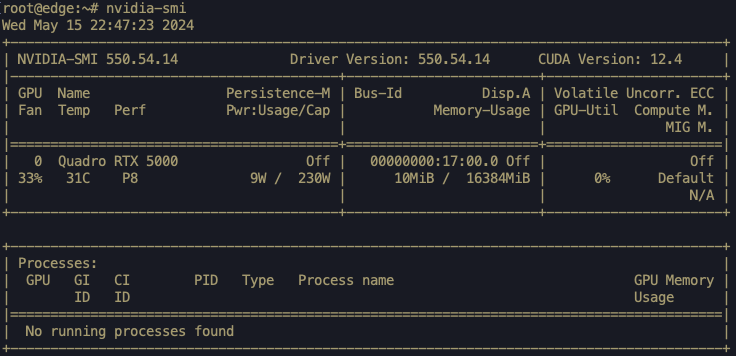
In the container, we provide an example program test_gpu.py to compare the execution time of CPU and GPU in computing squares of random numbers in an array of size 100000000. Run the following steps to execute the program.
# cd
# python3 test_gpu.py
The program gives the execution time of same task by CPU and GPU as follows:

Note
You can install the required libraries and use the GPU for executing your own programs for data analytics at the edge node using the container.