ARA Weather Collection
Platform: ARA Weather Sensors and Disdrometers
Resources Needed: Any compute node.
Description: The experiment is designed to demonstrate the use of ARA weather sensors and disdrometers (as shown in the figure below) to collect the live weather data. The extracted weather data can be integrated in your own AraRAN/AraHaul experiment code or can be used to analyze the weather in standalone mode. More details on the weather parameters and APIs can be found here.
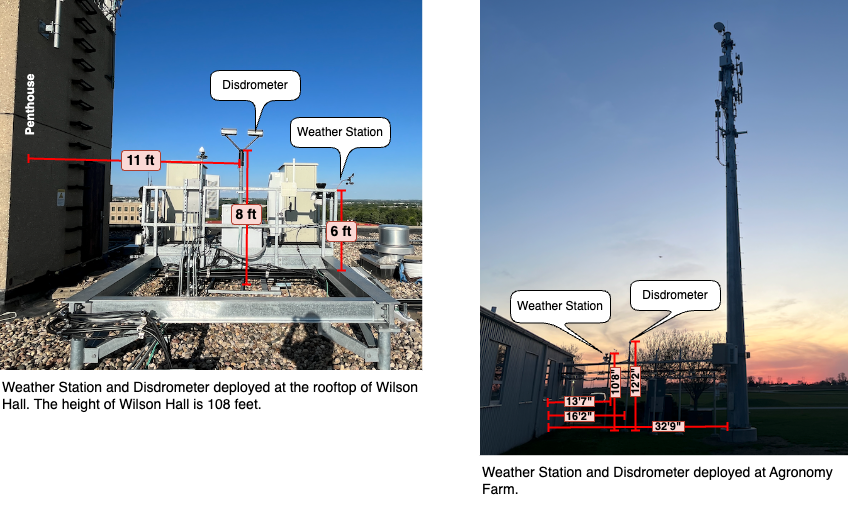
Detailed Steps
Login to ARA portal with your username and password.
Note
If you are a first time user, we highly recommended you to try the Hello World experiment experiment first to get familiarized with the portal and experiment workflow.
Create a reservation using the Project -> Reservations -> Leases tab from the dashboard with the following attributes:
Site: DataCenter
Resource Type: Compute Node
Device Type: Compute
Device ID: 000 or 001
Launch a container using the information provided below. You can keep the remaining attributes default or depending on your choice.
Container Image:
arawirelesshub/ara-ubuntu:22.04Network: ARA_Shared_Net
Note
Ideally weather data collection can be done on any node (compute, base station, user equipment, AraHaul, etc.) and with any container. For this example, we use the node DataCenter-Compute-000 and the baseline ara-ubuntu to demonstrate the experiment.
Once the container is launched, take a note on the floating IP and SSH to the container via the ARA jumpbox. Detailed instructions for accessing the container via jumpbox can be found here.
In the container, run the following commands to install the packages and arawireless Python library, which includes APIs for weather data collection.
# apt update
# apt install python3-pip git -y
# pip install git+https://gitlab.com/aralab/arasoft/arawireless.git
Download the data collection script.
# wget https://gitlab.com/aralab/arasoft/arawireless/-/raw/master/record_weather.py
Run the data collection script using the sampling interval and the locations in the following format.
# python3 record_weather.py <interval in seconds> <site-1> <site-2>
The following command collects the weather data from WilsonHall every 4 seconds.
# python3 record_weather.py 4 AgronomyFarm
For collecting data from multiple locations, you can append the locations at the end of the command. For example, the command below collects data from AgronomyFarm as well as WilsonHall.
# python3 record_weather.py 4 AgronomyFarm WilsonHall
Note
In ARA, the weather sensors and disdrometers sample the weather data every 3-4 seconds. Sampling interval less than 4 may generate redundant data. You can change the sampling interval as per your experiment requirements.
Execution of the above command creates the following output.

The script runs continuously until you press Ctrl-C. The script writes the weather data into CSV files, separately for each location. For example, the command generates files AgronomyFarm.csv, WilsonHall.csv, etc. depending on the sites we have given. We can run the following command to see content in the file.
# cat AgronomyFarm.csv
The command displays the content within the file as follows:

The code record_weather.py can be modified according to our needs to collect the weather data in standalone mode.
Note
In fact, we can include the following Python code snippet within our AraRAN or AraHaul measurement scripts as well to package our experiments.
from araweather import weather

weather_data = weather.get_current_weather(['WilsonHall'])
weather.write_to_file(weather_data)