Aviat Link Configuration (Microwave and Millimeter-wave) and Status Check
Resources needed: Aviat Networks mmWave and microwave radios (WTM 4800) and radio host servers.
Short Description: Aviat link configuration and measurement.
Detailed Description: The experiment allows users to measure the configuration parameters of Aviat radios and check related metrics. The following figure shows the experiment setup involving a long-range (~6 miles) microwave/millimeter-wave links.
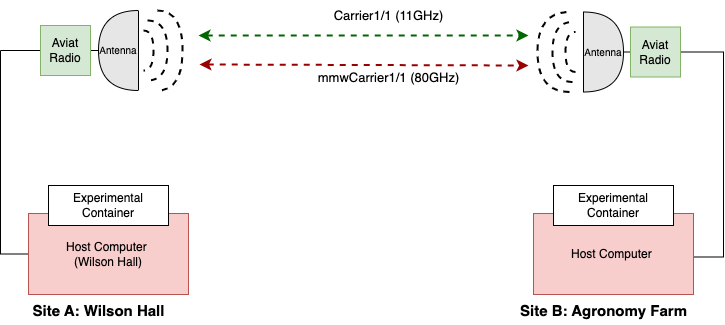
Follow the steps below to create leases and launch containers for this experiment:
Login to the portal portal.arawireless.org with login credentials.
Select a link from the below list to perform the experiment.
Wireless Links Link no
EndPoint1
EndPoint2
Radio Type
link1
Wilson Hall
Agronomy Farm
WTM 4811
link2
Wilson Hall
ISICS
WTM 4811
link3
Gilbert
ISICS
WTM 4811
link4
Gilbert
Agronomy Farm
WTM MBXD-4800
link5
Wilson Hall
Gilbert
WTM MBXD-4800
link6
Gilbert
Agronomy Farm
WTM MBXD-4200
link7
Wilson Hall
Gilbert
WTM MBXD-4200
link8
Gilbert
Boone
WTM MBXD-4200
link9
Agronomy Farm
Boone
WTM 4811
link10
Gilbert
Boone
WTM MBXD-4800
Create two reservations using the Project -> Reservations -> Leases tab from the dashboard. For example, for link1, reserve the below Host Computers.
Aviat Host Computer at Wilson Hall
Site: Wilson Hall
Resource Type: AraHaul
Device Type: Host
Device ID: 000
Aviat Host Computer at Agronomy Farm
Site: Agronomy Farm
Resource Type: AraHaul
Device Type: Host
Device ID: 000
Launch containers, using Project -> Containers tab in the dashboard, on both the reserved nodes using the corresponding reservation IDs. For containers, use the Container Image as
arawirelesshub/aviatcli:ssh. Provide other attributes as per your discretion following the ARA Hello World Experiment.Once the container is launched, note the floating IP to access the container remotely through SSH via ARA jumpbox. Visit ARA Jumpbox for more information on accessing containers via jumpbox.
The containers can be accessed via the console tab of the respective containers in the Project -> Containers tab from the dashboard or using SSH via the jumpbox server.
Run the below command in the container’s CLI for selecting the same link that you have made the reservations. For example, for link1
# . /setlink.sh link1
Checking the Status of Link/Radio
For retrieving the carrier capabilities of the Aviat radio from local-end (i.e., measuring the carrier capability of Aviat Radio of Wilson Hall from Wilson Hall itself), execute the following command in the console of the container launched at Wilson Hall host:
For 11 GHz
# aviatcli carrier show capabilities Carrier1/1For 80 GHz
# aviatcli carrier show capabilities mmwCarrier1/1
To check the carrier capabilities of radio remotely, i.e., retrieve the capabilities of Wilson Hall Aviat radio from Agronomy Farm or vice versa, use the following command in the respective container console:
For 11 GHz
# aviatcli carrier show capabilities Carrier1/1 --remoteFor 80 GHz
# aviatcli carrier show capabilities mmwCarrier1/1 --remote
To check the carrier configuration status of local-end Aviat radio using the command below:
For 11 GHz
# aviatcli carrier show status Carrier1/1For 80 GHz
# aviatcli carrier show status mmwCarrier1/1Example output:
root@198849877b10:/# aviatcli carrier show status mmwCarrier1/1

Welcome to the WTM4800 Multi-band CLI

admin connected from 10.188.0.131 using ssh on WilsonHall
WilsonHall# show radio-carrier status mmwCarrier1/1
radio-carrier status mmwCarrier1/1
oper-status up
remote-oper-status      up
regulatory-standard     ANSI
bandwidth               2000.0 MHz
tx-modulation           qam-64
rx-modulation           qam-64
current-tx-power        11.5 dBm
tx-frequency            83500000 kHz
rx-frequency            73500000 kHz
tx-rx-spacing           10000000 kHz
tx-airlink-capacity current 8184.284 Mbps
tx-airlink-capacity average 7396.952 Mbps
tx-airlink-capacity maximum 9902.343 Mbps
rx-airlink-capacity current 8184.284 Mbps
rx-airlink-capacity average 7791.966 Mbps
acm-tx-status           enable
snr                     27.5 dB
remote-snr              26.3 dB
rsl                     -47.0 dBm
remote-rsl              -47.8 dBm
fade-margin             4.0 dB
atpc-fade-margin        -1.5 dB
remote-fade-margin      3.2 dB
remote-atpc-fade-margin -2.3 dB
ber                     0.00E+00
tx-mute                 disable
power-mode              atpc
fcc-atpc                disable
active-rx-time          605237 s
rx-sync-loss-time       8261 s
all-bytes               314.25 T
un-correctable-bytes    183622756608
To check the carrier configuration status of remote-end Aviat radio using the below command
For 11 GHz
# aviatcli carrier show status Carrier1/1 --remoteFor 80 GHz
# aviatcli carrier show status mmwCarrier1/1 --remote
To check the whole radio capabilities of Aviat radio locally and remotely, the following commands can be used
# aviatcli radio show capabilitiesExample output
root@41f0d45138c3:/# aviatcli carrier show capabilities

Welcome to the WTM4800 Multi-band CLI

admin connected from 10.188.0.131 using ssh on WilsonHall
WilsonHall# show radio-carrier capabilities Carrier1/1
radio-carrier capabilities Carrier1/1
min-tx-frequency           11200000 kHz
max-tx-frequency           11505000 kHz
min-rx-frequency           10695000 kHz
max-rx-frequency           10995000 kHz
available-min-output-power 9.5 dBm
available-max-output-power 29.5 dBm
available-max-acm          qam-4096
freq-step                  50.0 kHz
freq-band                  11.0 GHz
freq-max-edge-to-edge      500000 kHz
max-airlink-throughput     1062.05 Mbps
supported-ANSI-bandwidths  [ 3.75 5.0 10.0 20.0 25.0 30.0 40.0 50.0 60.0 75.0 80.0 100.0 ]
supported-ETSI-bandwidths  [ 7.0 14.0 28.0 40.0 56.0 80.0 100.0 105.0 112.0 ]
supported-modulations      [ qpsk qam-16 qam-32 qam-64 qam-128 qam-256 qam-512 qam-1024 qam-2048 qam-4096 ]
min-tx-rx-spacing          205000 kHz
max-tx-rx-spacing          810000 kHz
standard-tx-rx-spacings    [ 490000 500000 520000 530000 ]
custom-tx-rx-spacings      Capable
idq-optimisation-capable   Capable
# aviatcli radio show capabilities --remoteExample Output
root@3cc6e67b765e:/# aviatcli radio show capabilities --remote

Welcome to the WTM4800 Multi-band CLI

admin connected from 10.188.2.4 using ssh on AgFarm
AgFarm# show radio-link capabilities

NAME   XPIC CAPABLE   MIMO CAPABLE  A2C CAPABLE   SPACE DIVERSITY CAPABLE    TX PROTECTION CAPABLE

Radio1  NOT capable    NOT capable    capable            capable                   NOT capable
For checking the radio status of local and remote ends Aviat radio using the below command
# aviatcli radio show status# aviatcli radio show status --remoteExample Output
root@3cc6e67b765e:/# aviatcli radio show status --remote

Welcome to the WTM4800 Multi-band CLI

admin connected from 10.188.2.4 using ssh on AgFarm
AgFarm# show radio-link status
radio-link status Radio1
oper-status     up
mode            two-plus-zero
mlhc            disable
a2c             disabled
xpic            disabled
mimo            disabled
space-diversity disabled
tx-protection   disabled
attached-carriers [ Carrier1/1 mmwCarrier1/1 ]
Configuring the Link/Radio Parameters
In addition to the radio/link status check, ARA provides APIs to configure the radios and change the link characteristics. The following commands provide options for enabling/disabling, configuring, and checking the status of the link.
Note
Before changing the configuration, ensure the existing configuration of the carrier. In addition, if you want to change the carrier from Carrier-A to Carrier-B, strictly follow the sequence: (1) enable Carrier-B; (2) disable Carrier-A. For example, if the current carrier is Carrier1/1 and you want to change the Carrier to mmwCarrier1/1, first you should enable mmwCarrier1/1 and disable Carrier1/1.
aviatcli carrier [OPTIONS] COMMAND [ARGUMENTS] ...For example, for getting help on the OPTIONS and ARGUMENTS, use the following command:
aviatcli carrier --help
Note
Provide --help option to any command to get usage
information from that level onward.
Enable the microwave carrier, i.e., Carrier1/1
# aviatcli carrier enable Carrier1/1Example Output
root@demohost:~# aviatcli carrier enable Carrier1/1

Welcome to the WTM4800 Multi-band CLI

admin connected from 10.188.0.131 using ssh on WilsonHall
WilsonHall# config
Entering configuration mode terminal
WilsonHall(config)# interface Carrier1/1
WilsonHall(config-interface-Carrier1/1)# enabled
WilsonHall(config-interface-Carrier1/1)# commit
# aviatcli carrier enable Carrier1/1 --remoteExample Output
root@demohost:~# aviatcli carrier enable Carrier1/1 --remote

Welcome to the WTM4800 Multi-band CLI

admin connected from 10.188.2.4 using ssh on AgFarm
AgFarm# config
Entering configuration mode terminal
AgFarm(config)# interface Carrier1/1
AgFarm(config-interface-Carrier1/1)# enabled
AgFarm(config-interface-Carrier1/1)# commit
Configure the Aviat link characteristics.
Get help on the provided configuration options with the following commands.
# aviatcli carrier configure --help# aviatcli carrier configure all --helpThe basic API usage of Aviat configuration is
aviatcli carrier configure [OPTIONS] COMMAND [ARGUMENTS] ...
Note
This configuration is applicable exclusively to Link1: Wilson Hall to Agronomy Farm. Each link in the network is assigned distinct frequencies by the FCC, and therefore the frequency list we provide will correspond only to the designated link. Frequencies for other links will be documented separately to ensure compliance with their individual FCC assignments.
Caution
Take sufficient care while changing the radio parameters.
# aviatcli carrier configure all -b 50 -t 11325000 -r 10835000 -f
qam-2048 -p 26 Carrier1/1
Example output
root@demohost:~# aviatcli carrier configure all -b 50 -t 11325000 -r 10835000 -f qam-2048 -p 26 Carrier1/1

Welcome to the WTM4800 Multi-band CLI

admin connected from 10.188.0.131 using ssh on WilsonHall
WilsonHall# config
Entering configuration mode terminal
WilsonHall(config)# interface Carrier1/1
WilsonHall(config-interface-Carrier1/1)# power rtpc selected-output-power 26.0
WilsonHall(config-interface-Carrier1/1)# bandwidth ANSI 50.0
WilsonHall(config-interface-Carrier1/1)# tx-frequency 11325000
WilsonHall(config-interface-Carrier1/1)# rx-frequency 10835000
WilsonHall(config-interface-Carrier1/1)# coding-modulation Fixed qam-2048
WilsonHall(config-interface-Carrier1/1)# commit


Welcome to the WTM4800 Multi-band CLI

admin connected from 10.188.2.4 using ssh on AgFarm
AgFarm# config
Entering configuration mode terminal
AgFarm(config)# interface Carrier1/1
AgFarm(config-interface-Carrier1/1)# power rtpc selected-output-power 26.0
AgFarm(config-interface-Carrier1/1)# bandwidth ANSI 50.0
AgFarm(config-interface-Carrier1/1)# tx-frequency 10835000
AgFarm(config-interface-Carrier1/1)# rx-frequency 11325000
AgFarm(config-interface-Carrier1/1)# coding-modulation Fixed qam-2048
AgFarm(config-interface-Carrier1/1)# commit
Commit complete.
AgFarm(config-interface-Carrier1/1)#
root@demohost:~#
# aviatcli carrier show status Carrier1/1
# aviatcli carrier configure all -b 1000 -t 83500000 -r 73500000 -f qam-16 -p 14.5 mmwCarrier1/1Example output
root@demohost:~# aviatcli carrier configure all -b 1000 -t 81500000 -r 71500000 -f qam-16 -p 14.5 mmwCarrier1/1

Welcome to the WTM4800 Multi-band CLI

admin connected from 10.188.0.131 using ssh on WilsonHall
WilsonHall# config
Entering configuration mode terminal
WilsonHall(config)# interface mmwCarrier1/1
WilsonHall(config-interface-mmwCarrier1/1)# power rtpc selected-output-power 14.5
WilsonHall(config-interface-mmwCarrier1/1)# bandwidth ANSI 1000.0
WilsonHall(config-interface-mmwCarrier1/1)# tx-frequency 83500000
WilsonHall(config-interface-mmwCarrier1/1)# rx-frequency 73500000
WilsonHall(config-interface-mmwCarrier1/1)# coding-modulation Fixed qam-16
WilsonHall(config-interface-mmwCarrier1/1)# commit

Welcome to the WTM4800 Multi-band CLI

admin connected from 10.188.2.4 using ssh on AgFarm
AgFarm# config
Entering configuration mode terminal
AgFarm(config)# interface mmwCarrier1/1
AgFarm(config-interface-mmwCarrier1/1)# power rtpc selected-output-power 14.5
AgFarm(config-interface-mmwCarrier1/1)# bandwidth ANSI 1000.0
AgFarm(config-interface-mmwCarrier1/1)# tx-frequency 73500000
AgFarm(config-interface-mmwCarrier1/1)# rx-frequency 83500000
AgFarm(config-interface-mmwCarrier1/1)# coding-modulation Fixed qam-16
AgFarm(config-interface-mmwCarrier1/1)# commit
Tip
If you want to perform weather measurements along with the RAN experiments, refer to ARA Weather APIs.