Measurement and Configuration of AraMIMO UE
Platform: Skylark Wireless
Resources needed: Customer Premises Equipment (CPE)/User Equipment (UE)
- Short Description: The experiment is designed to monitor wireless
link parameters of the AraMIMO UE.
Detailed Description: AraMIMO consists of multiple CPEs connected to the Base Station (BS) which is a Skylark Wireless Faros V2 equipment. With this experiment, we can launch a container equipped with APIs to interact with Skylark CPE and measure real-time metrics such as received power or to configure the gain of the Skylark CPE.
Detailed Steps
Login to the portal
portal.arawireless.orgwith your username and password. Please go through the Hello World example on how to login to portal, create a lease, launch a container, assign a floating IP address and accessing the container (or make sure you have already run that experiment successfully and are familiar with using the experiment portal).Note
If you are a first time user, it is highly recommended to run the Hello World experiment first to get familiarized with the interface and portal.
Create a reservation using the Project -> Reservations -> Leases tab from the dashboard.
Click on
create Leaseand write the Lease Name e.g. skylark_mimo_1 and clickNext.Select the resource attributes e.g.:
Site: Curtiss Farm
Resource Type: AraRAN
Device Type: User Equipment
Device ID: 000
Note
Some UEs have no Skylark CPE. Check the ARA Resources Overview on the portal to see which UE sites have the Skylark Experiment available and then select The above attributes according to the sites.
Launch a container equipped with APIs using the container image
arawirelesshub/aramimo:v1.1Once the container is launched, take a note of the floating IP if you want to access the container from your PC via ARA jumpbox.
The containers can be accessed via the
Consoletab of the respective containers in the Project -> Containers tab.To SSH to the container using floating IP, ssh needs to enabled in the container. In
Console, run the following command# service ssh start
Set the password for root by typing the following command and then set the password
# passwdNow the container can be accessed both from the dashboard Console or using ssh from the jumpbox server.
To ssh to the container, use the floating IP that is reserved for the container with root as username and password that is set in previous step. Visit ARA Jumpbox for more information on accessing containers via jumpbox.
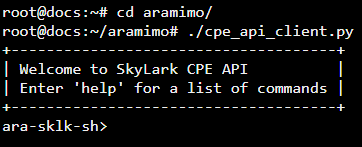
In the container, Run the following command to launch the CLI.
# cd aramimo
# ./cpe_api_client.py
Run the following command to check if the CPE is connected to BS.
> get_connection_status

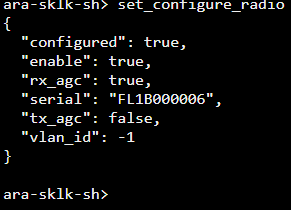
If the UE is not connected, it can be connected to the BS, provided the BS is working and transmitting already. Each UE has a configuration script that can be used to configure and start the radio. The configuration file is not visible to the users and is automatically handled by the wrapper APIs. Run the following command to configure and start the radio to be able to connect to the BS. It takes about a minute for the CPE to get connected to the BS.
> set_configure_radio
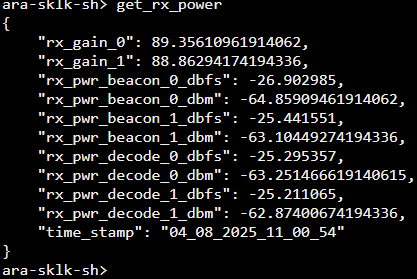
Run the following command to check the received power values.
> get_rx_power
Type
`help -v`to show all the commands that can be run. Here are the list of commands that can be run.get_phy_stats Return detailed PHY statistics of the radio get_rx_gain Return Rx Gain in dB get_rx_power Return Rx Power in dBFs and dBm along with current Rx Gains get_tx_gain Return Tx Gain in dB set_close_radio Disable the Radio PHY set_configure_radio Configure the Radio to start transmission set_rx_gain Set Rx Gain in dB set_tx_gain Set Tx Gain in dB
UE wrapper APIs also enable configuration of the UE parameters, such as setting the transmit gain, disconnecting the radio (set_close_radio) or reconnecting it (set_configure_radio) to the the BS.
This container contains the AraMIMO Repo on Gitlab which contains other useful scripts along with documentation. The AraMIMO API is documented in the user manual.
If you need to collect data, there are multiple example scripts in the aramimo repo. e.g. to capture capacity, SNR, MCS, for each UE, run the
kpi_data_scriptby providing the number of iterations. Note that those scripts are for getting the data from the BS so they have to be modified to get the data from the UE. For getting the data from the BS, container has to be launched on the BS.
Tip
If you want to perform weather measurements along with the RAN experiments, refer to ARA Weather APIs.