COTS 5G Ericsson gNB Coverage Measurement
Platform: Ericsson COTS 5G Base Station and Quectel RG510Q UE
Resources used: Ericsson COTS 5G Base Station (Research Park), Quectel RM5xxQ-GL (UE), Moshell API container, and COTS UE measurement container.
Description: This experiment demonstrates how to control the transmit power of a commercial off-the-shelf (COTS) 5G base station and measure the impact on received signal quality and throughput at the user equipment. The experiment uses the Moshell API to dynamically adjust base station parameters and Python-based measurement scripts to collect RF metrics (RSRP, SINR, and RSRQ) and throughput. In short the experiment allows you to
Control COTS 5G base station parameters via API calls
Measure received signal quality metrics at the UE
Observe the relationship between transmit power and signal quality
Collect uplink and downlink throughput measurements
Detailed Steps for the Experiment
Login to ARA portal with your username and password.
Note
If you are a first time user, it is highly recommended to run the Hello World experiment experiment first to get familiarized with the interface and the portal.
Create two reservations using the Project -> Reservations -> Leases tab from the dashboard with the following attributes:
Note
The base station and UE must be reserved together to ensure proper connectivity for this experiment.
Lease-1: COTS Base Station (referred to as cots_bs_lease in subsequent steps)
Site: ResearchPark
Resource Type: AraRAN
Device Type: COTS Base Station
Device ID: 000
Lease-2: User Equipment (referred to as ue_lease in subsequent steps)
Site: ISICS
Resource Type: AraRAN
Device Type: User Equipment
Device ID: 021
Create two containers on the created leases using the Project -> Containers tab from the dashboard. The container attributes are as follows:
Container 1: Moshell API Container (On the BS)
Image:
arawirelesshub/moshell-api:latestCommand: bash
Hostname: optional
CPU: Default
Memory: Default
Lease: cots_bs_lease
Network: ARA_Shared_Net
Container 2: UE Measurement Container (On the UE)
Image:
arawirelesshub/cots:baselineCommand: bash
Hostname: optional
CPU: Default
Memory: Default
Lease: ue_lease
Network: ARA_Shared_Net
Once the container is launched, take a note on the floating IP and SSH to the container via the ARA jumpbox. Detailed instructions for accessing the container via jumpbox can be found here.
Test the Moshell API Connection: In the Moshell API container at the BS, verify connectivity to the base station by listing the NR cells configured on the gNodeB. Run the following command:
# curl -X POST http://192.168.1.1:5002/lst_cellYou will receive a response showing the NR cell configuration including cell identifiers, operating frequencies, and administrative states as follows.
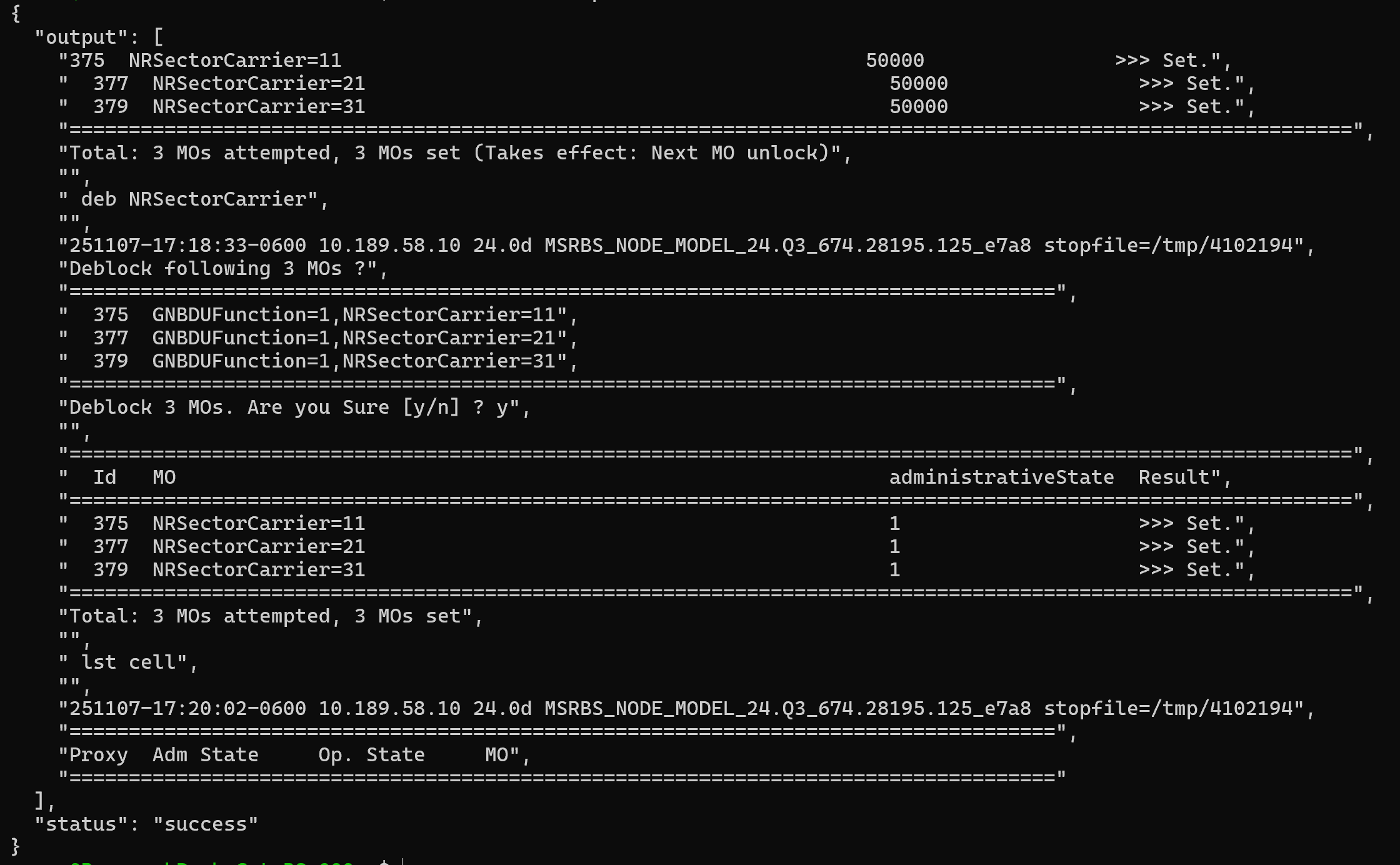
Moshell API response showing NR cell configuration on the Ericsson gNodeB
Note
The IP address 192.168.1.1 is a local IP used to communicate with the COTS Base Station. For a complete list of available API calls, refer to the ARA COTS 5G Ericsson APIs.
Using Python to Call the API
As an alternative to using
curl, you can also interact with the Moshell API using Python’srequestslibrary. This is useful for integrating API calls into automated scripts or custom measurement workflows.Example: List NR Cells (list_nr_cells.py)
import requests

# List NR cells configured on the gNodeB
response = requests.post("http://192.168.1.1:5002/lst_cell")
print(response.json())
Example: Set Transmit Power
import requests

# Set transmit power to 50000 mW
payload = {"power": 50000}
response = requests.post(
             "http://192.168.1.1:5002/set_TxPw",
             json=payload
             )
print(response.json())
The above code is provided in the container. You can run the program by the following.:
# cd
# python3 list_nr_cells.py
# python3 set_transmit_power.py
These Python examples perform the same operations as the
curlcommands shown above.Collect Baseline RF Measurements
In the UE Measurement container, run the measurement script to collect baseline signal quality metrics.
# ./measure_cots.py -t 5The
-t 5flag specifies a 5-second measurement duration. The script will output RF metrics including:Timestamp: Time of measurement
Band: Frequency band (mid-band)
ARFCN: Absolute Radio Frequency Channel Number
RSRP: Reference Signal Received Power (dBm)
SINR: Signal-to-Interference-plus-Noise Ratio (dB)
RSRQ: Reference Signal Received Quality (dB)
CellID: Physical Cell ID
CellName: Base station identifier
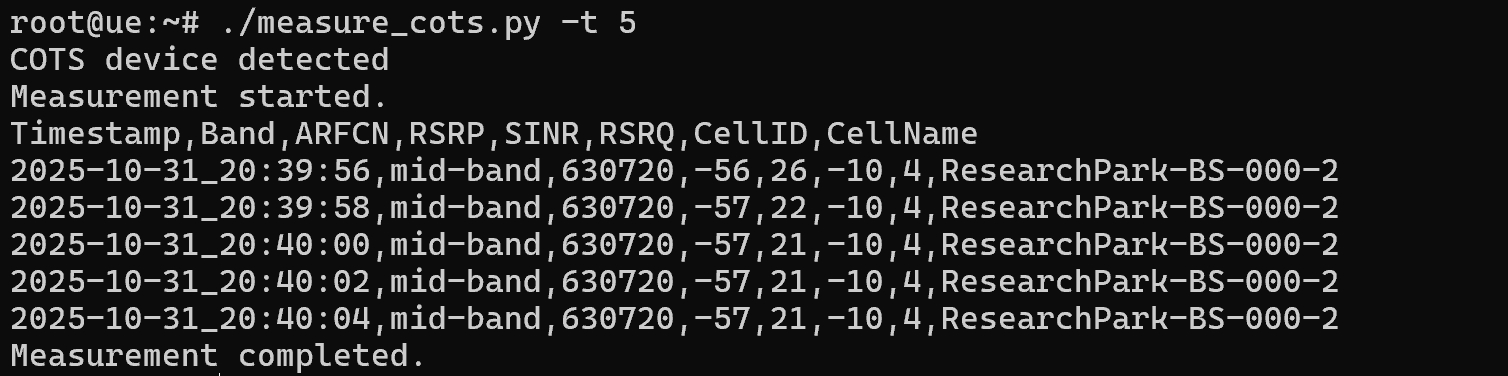
Baseline RF measurements showing RSRP of -56 dBm
Adjust Base Station Transmit Power
In the Moshell API container, modify the transmit power of the base station using the following API call.
# curl -X POST "http://192.168.1.1:5002/set_TxPw" -H "Content-Type: application/json" -d "{\"power\": 50000}"The power parameter is specified in milliwatts (mW) and can range from 0 to 128000 mW. The default power setting is 128000 mW. For this experiment, we use 50000 mW as an example value.
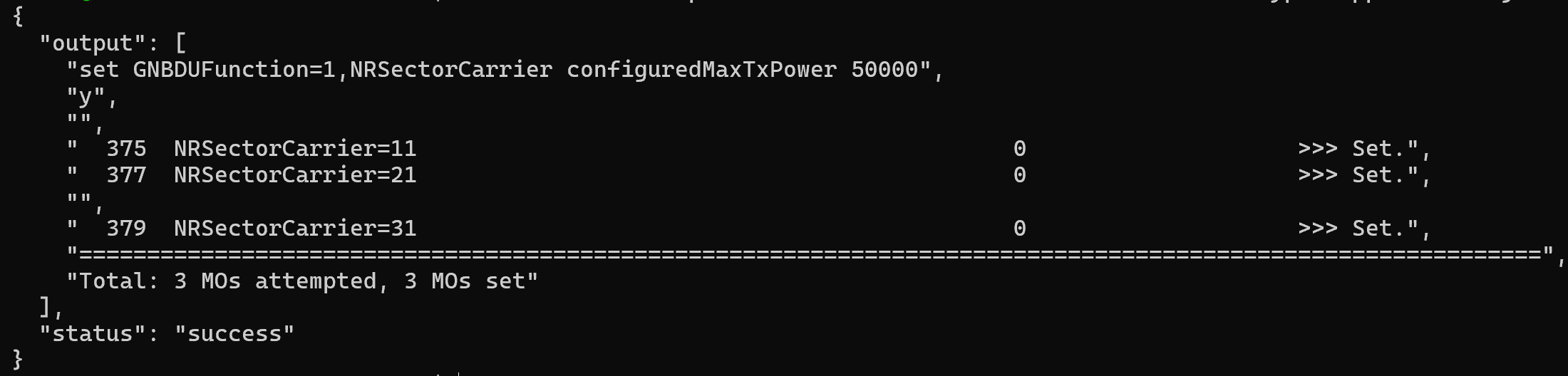
Setting base station transmit power to 50000 mW
Measure Signal Quality After Power Change
Return to the UE Measurement container and run the measurement script again as follows.
# ./measure_cots.py -t 5Observe the changes in RSRP, SINR, and other metrics after reducing the transmit power. As expected, reducing the base station transmit power results in a decrease in RSRP at the UE. In this example, the RSRP dropped from -56 dBm to -61 dBm, demonstrating the direct relationship between transmit power and received signal strength.
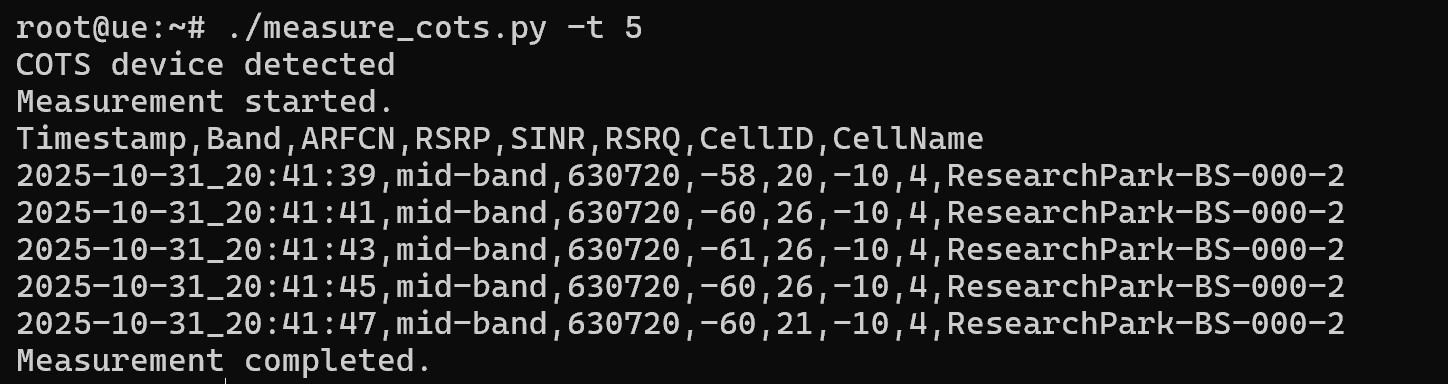
RF measurements after power adjustment showing RSRP decrease from -56 dBm to -61 dBm
Throughput Measurements
Identify the Cellular Interface: In the UE Measurement container, you’ll see a network interface corresponding to the Quectel. To identify this interface, run the following.
# ifconfigLook for a network interface that starts with either
wwan(e.g.,wwan0) orenxfollowed by a MAC address (e.g.,enxc25c7f04ef86). The interface will be assigned with an IP address from the 5G core network subnet (typically 10.45.0.x or similar).Run Throughput Test with iperf3
Once you have identified the cellular interface name, use iperf3 to measure throughput to the ARA iperf3 server at the data center. Replace <cellular_interface> with your actual interface name:
# iperf3 -c 10.189.8.8 -B <cellular_interface> -R -t 60 --logfile throughput_results.csvThis command will:
-c 10.189.8.8: Connect to the ARA iperf3 server at the data center
-B <cellular_interface>: Bind to your cellular data interface (e.g., wwan0 or enxc25c7f04ef86)
-R: Run in reverse mode (server sends to client, measuring downlink throughput)
-t 60: Run the test for 60 seconds
–logfile throughput_results.csv: Save results to a CSV log file
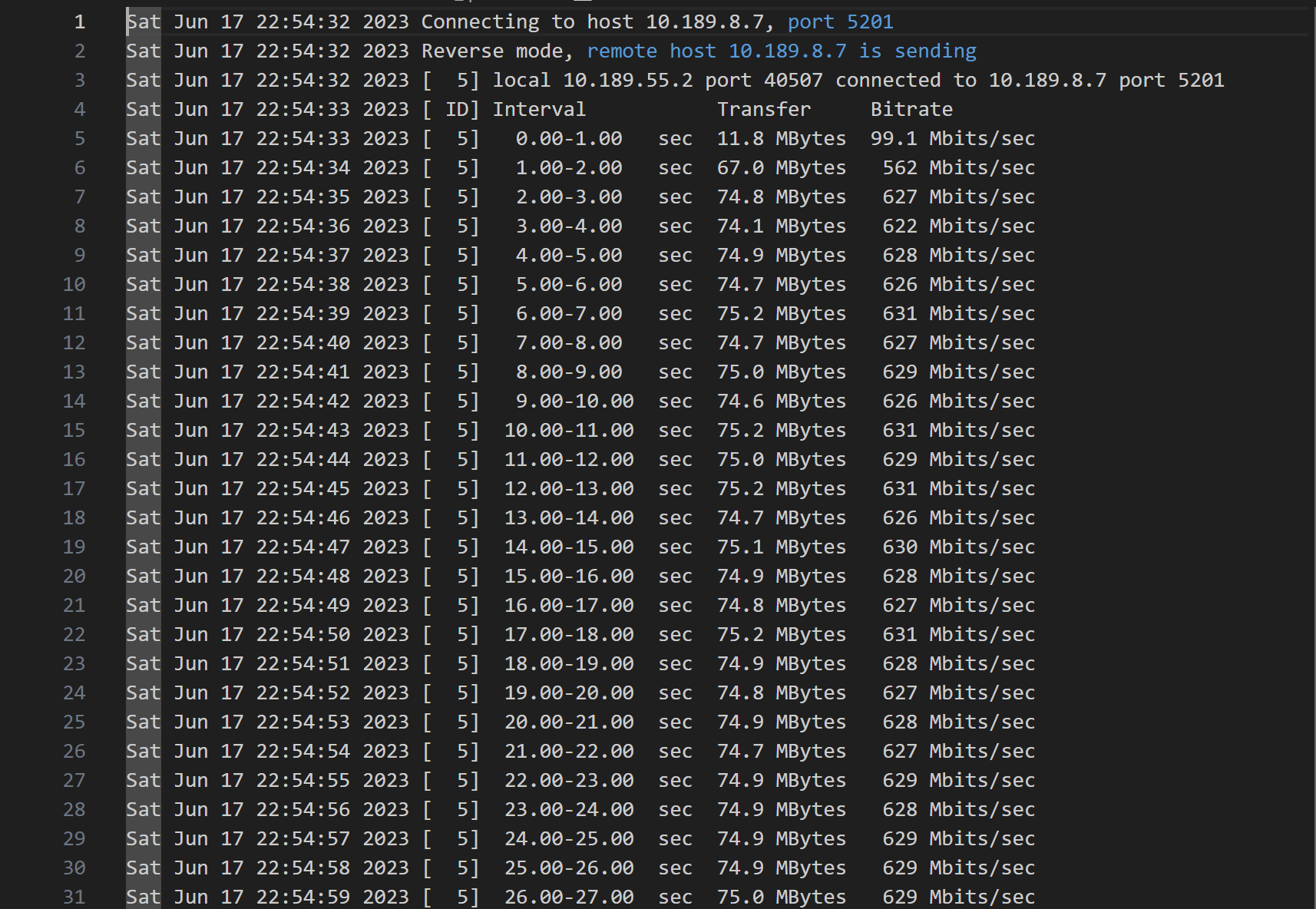
iperf3 throughput measurement results saved to CSV log file
For the uplink throughput measurement, omit the -R flag:
# iperf3 -c 10.189.8.8 -B <cellular_interface> -t 60 --logfile throughput_uplink.csvNote
The iperf3 server at 10.189.8.8 is maintained by ARA and is always running in the data center. The cellular interface is automatically configured by the Quectel Connection Manager when the UE container is reserved.
Data Collection and Analysis
All measurement data (RF metrics and throughput logs) are stored as CSV files in the container. Files can be copied to your local computer using the instructions provided here.