Transmitting, Receiving, and Visualizing Waveforms using UHD and GNURadio
Platform: Software Defined Radios.
Resources needed: 2 x USRP B210s
Short Description: Transmit and receive samples to a file using USRP Hardware Driver (UHD) and GNU Radio.
Detailed Description: The experiment makes use of UHD and Gnuradio to transmit signals from the base station, receive, visualize, and save the IQ samples to a file for analysis.
Follow the steps below to create leases and launch containers for this experiment:
Login to the portal ARA Portal with your username and password.
Create two reservations using the Project -> Reservations -> Leases tab from the dashboard:
gNB
Site: Sandbox
Resource Type: AraRAN
Device Type: Host
Device ID: 002
UE
Site: Sandbox
Resource Type: AraRAN
Device Type: Host
Device ID: 001
Create two containers on the respective nodes using the corresponding reservation IDs. For the containers, the Docker images can be used as follows:
gNB
Container Image:
arawirelesshub/openairinterface5g:oai_gnbCPU: 2
Memory: 5120
Network: ARA_Shared_Net
nrUE
Container Image:
arawirelesshub/openairinterface5g:oai_nrueCPU: 2
Memory: 5120
Network: ARA_Shared_Net
Note
Note that the above container images are equipped with USRP Hardware Driver (UHD).
Once the container is launched, take a note on the floating IP if you want to access the container from your PC via ARA jumpbox.
The containers can be accessed via the console tab of the respective containers in the Project -> Containers tab from the dashboard or using SSH via the jumpbox server.
In the gNB container, run the following commands to transmit a sample waveform with specific frequency, sampling rate, bandwidth, and gain.
# cd /usr/local/lib/uhd/examples
# ./tx_waveforms --freq 3586.08e6 --rate 5e6 --gain 70
The output from the tx_waveforms is as follows:
Creating the usrp device with: ...
[INFO] [UHD] linux; GNU C++ version 7.5.0; Boost_106501; UHD_4.0.0.HEAD-0-g90ce6062
[INFO] [MPMD] Initializing 1 device(s) in parallel with args: mgmt_addr=192.168.20.2,type=n3xx,product=n320,serial=32584FD,claimed=False,addr=192.168.20.2
[INFO] [MPM.PeriphManager] init() called with device args `mgmt_addr=192.168.20.2,product=n320,clock_source=gpsdo,time_source=gpsdo'.
[INFO] [MPM.Rhodium-0] init() called with args `mgmt_addr=192.168.20.2,product=n320,clock_source=gpsdo,time_source=gpsdo'
[INFO] [MPM.Rhodium-1] init() called with args `mgmt_addr=192.168.20.2,product=n320,clock_source=gpsdo,time_source=gpsdo'
[INFO] [MPM.Rhodium-0] Re-initializing daughter board. This may take some time.
[INFO] [MPM.Rhodium-0] init() called with args `mgmt_addr=192.168.20.2,product=n320,clock_source=internal,time_source=internal,skip_rfic=None,master_clock_rate=245760000.0,ref_clk_freq=25000000.0'
[INFO] [MPM.Rhodium-0.init.LMK04828] LMK initialized and locked!
[INFO] [MPM.Rhodium-0.DAC37J82] DAC PLL Locked!
[INFO] [MPM.Rhodium-0.AD9695] ADC PLL Locked!
[INFO] [MPM.Rhodium-0.init] JESD204B Link Initialization & Training Complete
[INFO] [MPM.Rhodium-1] Re-initializing daughter board. This may take some time.
[INFO] [MPM.Rhodium-1] init() called with args `mgmt_addr=192.168.20.2,product=n320,clock_source=internal,time_source=internal,skip_rfic=None,master_clock_rate=245760000.0,ref_clk_freq=25000000.0'
[INFO] [MPM.Rhodium-1.init.LMK04828] LMK initialized and locked!
Using Device: Single USRP:
  Device: N300-Series Device
  Mboard 0: n320
  RX Channel: 0
    RX DSP: 0
    RX Dboard: A
    RX Subdev: Rhodium
  RX Channel: 1
    RX DSP: 1
    RX Dboard: B
    RX Subdev: Rhodium
  TX Channel: 0
    TX DSP: 0
    TX Dboard: A
    TX Subdev: Rhodium
  TX Channel: 1
    TX DSP: 1
    TX Dboard: B
    TX Subdev: Rhodium

Setting TX Rate: 1.000000 Msps...
Actual TX Rate: 0.999024 Msps...

Setting TX Freq: 3500.000000 MHz...
Setting TX LO Offset: 0.000000 MHz...
Actual TX Freq: 3500.000000 MHz...

Setting TX Gain: 0.000000 dB...
Actual TX Gain: 0.000000 dB...

[INFO] [MPM.Rhodium-1.DAC37J82] DAC PLL Locked!
[INFO] [MPM.Rhodium-1.AD9695] ADC PLL Locked!
[INFO] [MPM.Rhodium-1.init] JESD204B Link Initialization & Training Complete
[WARNING] [0/Radio#0] Attempting to set tick rate to 0. Skipping.
Setting device timestamp to 0...
Checking TX: all_los: locked ...
Press Ctrl + C to stop streaming...
^C
Done!
To visualize the DFT/FFT of the waveform generated in Step 6, run the following command in the nrUE container.
# cd /usr/local/lib/uhd/examples
# ./rx_ascii_art_dft --freq 3586.08e6 --rate 1e6 --gain 40 --ref-lvl -60
The terminal displays DFT/FFT as in the figure below when we run
rx_ascii_art_dft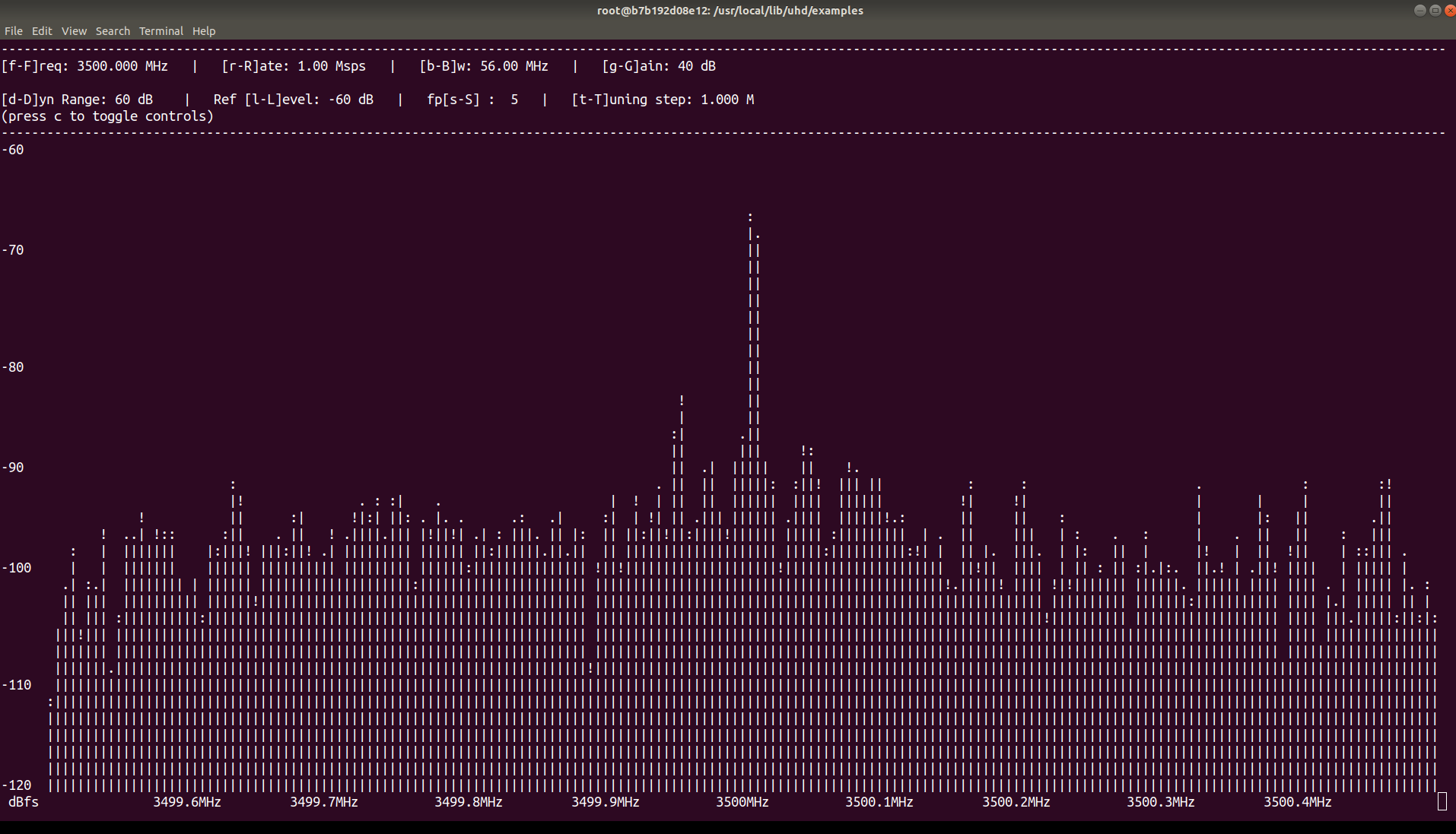
Note
We can change the properties of the waveform to suit our preference. Moreover, we can transmit an OFDM signal/waveform such as the one from the OAI nrsoftmodem.