OCUDU with OpenAirInterface nrUE (Indoor/Sandbox and Outdoor)
Platform: OCUDU 5G software stack with an OpenAirInterface5g (OAI) nrUE, running over Universal Software Radio Peripherals (USRPs).
Resources used:
Indoor/Sandbox — one USRP X310 as the Base Station and one USRP B210 as the UE, located within the X310’s coverage.
Outdoor — USRP NI N320 (Base Station), N320 host computer, a USRP B210 UE, B210 host computer, power amplifiers, CommScope SS-65M-R2 Sector BS Antenna, and the UE antenna.
Description: This experiment establishes an over-the-air 5G NR link between a OCUDU and an OpenAirInterface nrUE. The gNB bring-up follows the same workflow as the monolithic deployment in OCUDU Prototyping with O-RAN Compliant nearRT-RIC and xApps, but instead of a COTS Quectel UE the link is terminated by a software OAI UE running on a B210.

Experiment Architecture: OCUDU gNB (or CU-DU) connects over the air to an OpenAirInterface UE running on a USRP B210. The gNB reaches the Open5GS core (AMF/UPF) over the high-speed backhaul link, and the UPF provides the UE’s path to the Internet.
Note
This experiment uses a software OAI nrUE. If you instead want to drive the OCUDU gNB with a COTS Quectel UE and an O-RAN near-RT-RIC / xApp, see OCUDU Prototyping with O-RAN Compliant nearRT-RIC and xApps.
Note
For OCUDU 5G experiments, an Open5GS core network is deployed at the data center and runs an iperf3 server in the background. Users do not have direct access to the core network, but they can run iperf3 and ping commands against it from the UE.
Detailed Steps for the Experiment
Login to ARA portal with your credentials.
Reserve the Base Station and User Equipment. Create two reservations using the Project -> Reservations -> Leases tab from the dashboard. Select the tab below for your environment.
Reserve the X310 host as the gNB and a sandbox host whose B210 lies within the X310’s coverage as the UE. The example below uses the B210 with serial
8001408; confirm it is in Sandbox-Host-026’s coverage using the coverage map in ARA Sandbox Service.Resource No.
Site
Resource Type
Device Type
Device ID
1 (gNB)
Sandbox
AraRAN
Host
026
2 (nrUE)
Sandbox
AraRAN
Host
025 or any node in BS coverage
Note
Each sandbox host (001–025) is connected to two B210s, and hosts 026–028 are each connected to a single X310. For the current location and coverage of the X310s and B210s in the Sandbox, see ARA Sandbox Service.
Note
The B210 with
serial=8001408is only one example. Any B210 that falls within the X310 cell on Sandbox-Host-026 can serve as the UE. Check the coverage map in ARA Sandbox Service for the other B210s in the gNB’s cell, and reserve the sandbox host that owns the B210 you choose. If you pick a different B210, use its serial number in the--usrp-args "serial=..."flag of the nrUE command in Step 8.Reserve a Curtiss Farm Base Station and a UE in its footprint.
Resource
Site
Resource Type
Device Type
Device ID
1 (gNB)
Curtiss Farm
AraRAN
Base Station
000
2 (nrUE)
Curtiss Farm
AraRAN
User Equipment
000
Create the containers. Launch the containers on the respective nodes using the reservation IDs. The Base Station container ships the complete OCUDU stack (
gnb, cu and dubinary and the YAML configuration files), and the UE container ships OpenAirInterface5g with the nrUE.Component/Reservation
Container Image
CPU
Memory
Network
Base Station (gNB)
arawirelesshub/ocudu:indoor8
8192
ARA_Shared_Net
User Equipment (nrUE)
arawirelesshub/ocudu:oai_nrue8
8192
ARA_Shared_Net
Component/Reservation
Container Image
CPU
Memory
Network
Base Station (gNB)
arawirelesshub/ocudu:complete_outdoor_v18
8192
ARA_Shared_Net
User Equipment (nrUE)
arawirelesshub/ocudu:oai_nrue_outdoor_dev8
8192
ARA_Shared_Net
Once the containers are launched, take note of the floating IP if you want to access the containers from your PC via the ARA jumpbox. The containers can be accessed via the console tab of the respective containers in the Project -> Containers tab from the dashboard, or using SSH via the jumpbox server. Visit ARA Jumpbox for more information on accessing containers via the jumpbox.
Identifying and selecting the SDR. In the Base Station container, run the following command to list the radios (SDRs) connected to the host. In case the command cannot find an SDR, refer to the instructions in FAQ.
# uhd_find_devicesThe Sandbox-Host-026 host drives a single USRP X310. The command lists the X310 together with its
addr(IP address). Note this IP address — for this example we assume the X310 is reachable at192.168.50.2. You will write it into the gNB configuration file in Step 6c.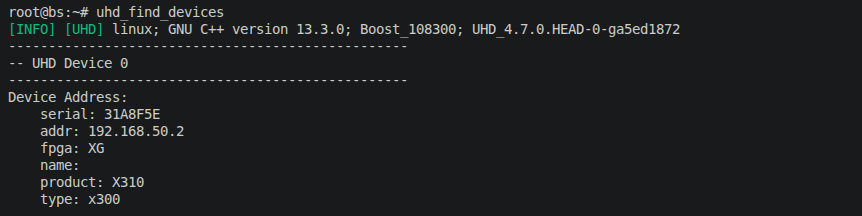
On the UE container, run
uhd_find_devicesas well to confirm the B210 is detected. This serial is used in the nrUE command in Step 8.The base station hosts multiple USRP N320 SDRs, each serving one sector. Select the SDR that serves the sector pointing toward your reserved UE. For CurtissFarm-UE-000, the SDR IP address is
192.168.20.2.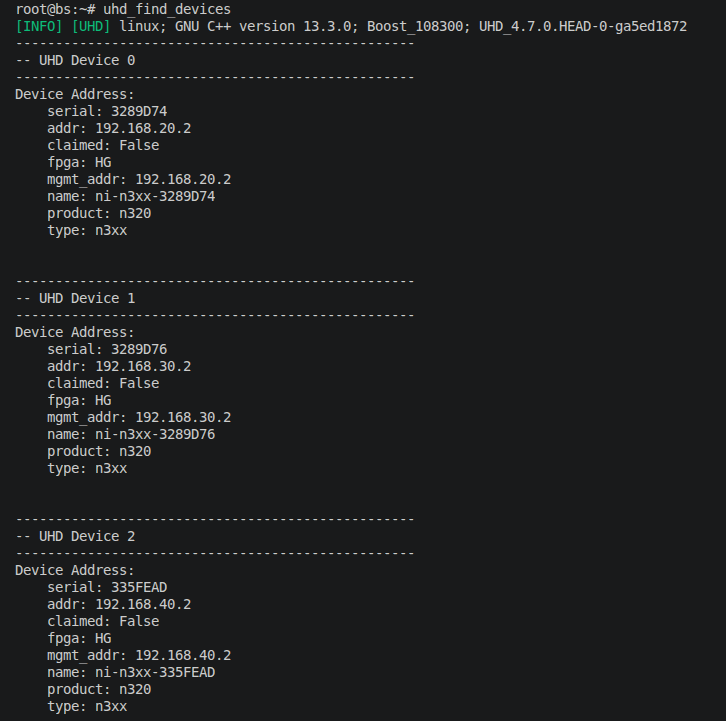
Note this SDR IP address — you will write it into the gNB configuration file in Step 6c.
Connecting the RAN to the core network. Before starting the gNB, the Base Station container must be able to reach the AMF of the data-center core network over its core-facing interface. The interface name differs by environment: Indoor/Sandbox containers use
eth2(IP in the10.189.6.xrange), while Outdoor containers mostly useeth4.6a. Note the core-facing interface IP address. Run
ifconfigin the Base Station container and note the IP of the core-facing interface for your environment.# ifconfig eth2
For this experiment we assume the IP address of
eth2is10.189.6.240.# ifconfig eth4
For this experiment we assume the IP address of
eth4is10.189.3.112.6b. Add the route to the core network and verify AMF reachability. The Base Station container ships an
add_route.shhelper that adds the static route to the core-network subnet. Pass your core-facing interface IP from Step 6a as its only argument.# ~/add_route.sh 10.189.6.240
Once the route is added, ping the AMF to confirm reachability:
# ping -I eth2 10.189.8.8
# ~/add_route.sh 10.189.3.112
Once the route is added, ping the AMF to confirm reachability:
# ping -I eth4 10.189.8.8
Important
The IP addresses shown above are only examples. Replace them with the actual core-facing interface IP you obtained from your own container in Step 6a. The script computes the gateway from the IP you pass, so handing it the wrong IP will install a wrong route.
A successful ping confirms the gNB can reach the AMF (
10.189.8.8). Stop the ping withCTRL+Conce a few replies are received.6c. Configure the gNB. Open the gNB YAML configuration file and update the N2/AMF bind address (and the SDR address for Outdoor).
Open the X310 configuration file:
# nano ~/ocudu/build/apps/gnb/gnb_x310_tdd_n78_40mhz.yaml
Since the X310 is the only SDR connected to the sandbox host, no SDR address entry is needed in
device_args. Only setbind_addrsundercu_cp->amfto theeth2IP from Step 6a (e.g.,10.189.6.240).
Open the N320 configuration file:
# nano ~/ocudu/build/apps/gnb/gnb_n320_tdd_n78_40mhz.yaml
Set
device_argstoaddr=192.168.20.2(the CurtissFarm-UE-000 SDR IP from Step 5) and setbind_addrsundercu_cp->amfto theeth4IP from Step 6a (e.g.,10.189.3.112).

Save (
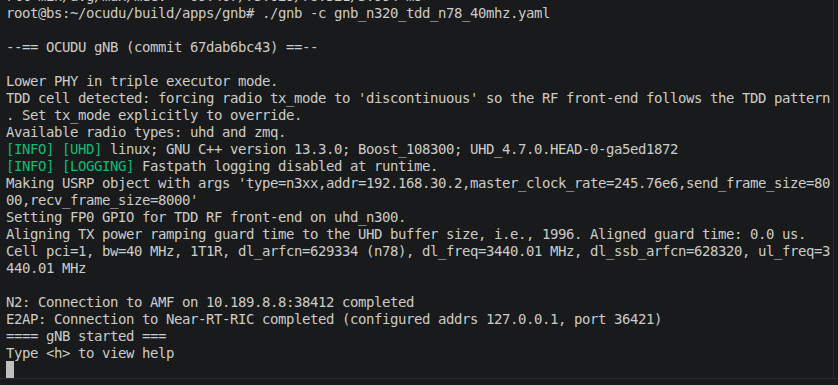
Ctrl+O) and exit (Ctrl+X) the nano editor.Start the monolithic gNB. In a new terminal of the Base Station container, start the gNB with the configuration file for your environment.
# cd ~/ocudu/build/apps/gnb
# ./gnb -c gnb_x310_tdd_n78_40mhz.yaml
# cd ~/ocudu/build/apps/gnb
# ./gnb -c gnb_n320_tdd_n78_40mhz.yaml
The gNB brings up the radio and connects to the AMF over the N2 interface. When you see
==== gNB started ====, the gNB is ready.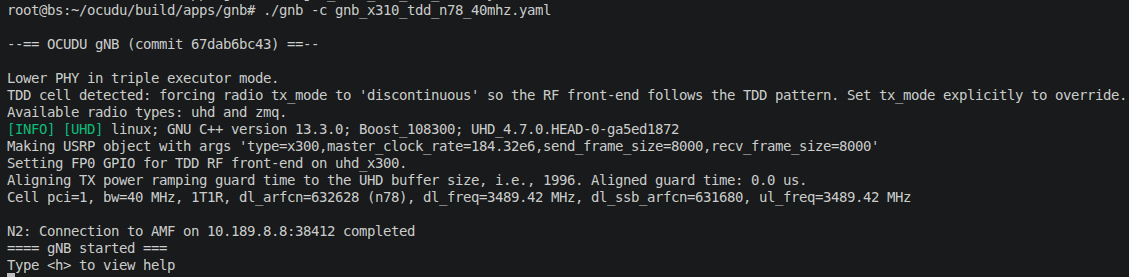
Bring up the OAI nrUE. In the UE container, start the OAI
nr-uesoftmodemUE using the command for your environment.The B210 UE is selected by its serial number (
serial=8001408).# cd ~/openairinterface5g # source oaienv # cd cmake_targets/ran_build/build # ./nr-uesoftmodem -O ../../../targets/PROJECTS/GENERIC-NR-5GC/CONF/ue.conf -r 106 --numerology 1 --band 78 -C 3489420000 --ue-fo-compensation -E --ssb 42 --usrp-args "serial=8001408" --uicc0.imsi 001010000000003
# cd ~/openairinterface5g
# source oaienv
# cd cmake_targets/ran_build/build
# ./nr-uesoftmodem -O ../../../targets/PROJECTS/GENERIC-NR-5GC/CONF/ue.conf -r 106 --numerology 1 --band 78 -C 3489420000 --ue-txgain 0 --ue-rxgain 80 --ue-fo-compensation -E --ssb 42 --uicc0.imsi 001010000000013
Console Traces
On establishing a successful connection, the gNB and nrUE provide the following output.

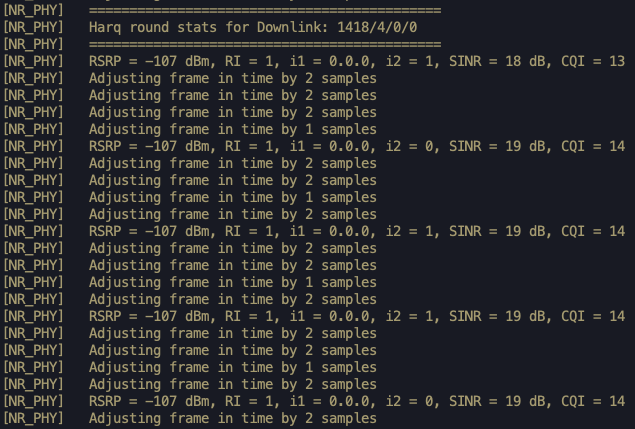
Note
When the connection is established, a new interface
oaitun_ue1appears at the nrUE container with an IP address assigned by the SMF of the core network. To find the IP address, open (or SSH into) another terminal for the nrUE container and runifconfig oaitun_ue1. The interface nameoaitun_ue1is used in the commands below.
Important
It may happen that the UE does not connect on the first attempt due to factors such as interference and line-of-sight (LoS) blockage. In such cases, stopping and running the nrUE command again provides a higher chance of getting the UE connected.
Ping test to the Core Network. On the nrUE container, run the following command to ping through the core network and confirm a stable connection. The same command is used for both environments.
# ping -I oaitun_ue1 8.8.8.8
For recording the ping output to a text file (say ping_output.txt), use:
# ping -I oaitun_ue1 8.8.8.8 | tee ping_output.txt
A successful ping output looks like the following.

On the gNB terminal, press
tfollowed byEnterto activate the traffic trace. While the ping is running, the stats table shows live DL and UL traffic from the ICMP packets.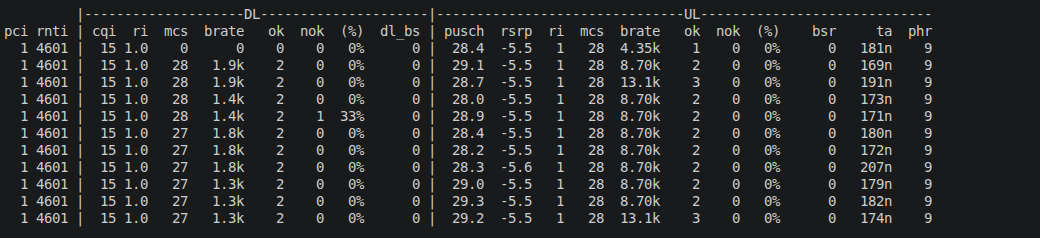
The file can be further copied to your local machine using the instructions provided in Experiment Data Collection.
Throughput Test
Measure throughput with iperf3. With the UE connected, run an iperf3 test from the nrUE container against the core-network iperf3 server. Use a bandwidth of 2M and bind to your
oaitun_ue1IP address (from Step 8). The same bandwidth is used for both indoor and outdoor.Uplink (UE -> core):
# iperf3 -c 10.45.0.1 -p 5203 -b 2M -B <oaitun_ue1 IP>
Downlink (core -> UE): add the
-R(reverse) flag.# iperf3 -c 10.45.0.1 -p 5203 -b 2M -B <oaitun_ue1 IP> -R
Note
Replace
<oaitun_ue1 IP>with your UE’s assigned IP address from Step 8.The iperf3 output shows the achieved throughput.
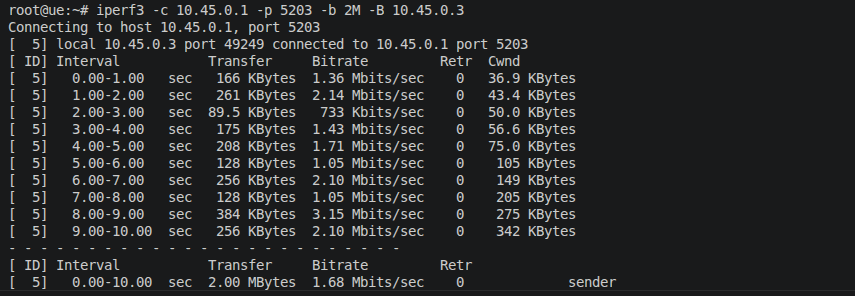
Troubleshooting
gNB cannot reach the AMF: Confirm you ran
add_route.shwith your owneth4IP from Step 6a, and that theping -I eth4 10.189.8.8succeeds before starting the gNB. The route must be in place for the N2/AMF connection to come up.UE fails to connect to the gNB: Stop and re-run the nrUE command. Confirm the B210 serial (indoor) and the center frequency / SSB match the gNB configuration. Refer to FAQ.
SDR not found: If
uhd_find_devicescannot find the SDR, refer to FAQ.
Tip
If you want to perform weather measurements along with the RAN experiment, refer to ARA Weather APIs.